Is Raycast Pro Worth the Upgrade? A Skeptic’s Review (2026)
Affiliate Disclosure: This post is not sponsored. I pay for Raycast Pro with my own money. If you purchase through links here, I may earn a small commission at no extra cost to you.
Bottom Line Up Front:
For 90% of Mac users, Raycast Free is more than enough—it is already vastly superior to Spotlight.
However, if you are a developer, writer, or power user who works across multiple Macs, the $8/month Pro plan is a no-brainer.
. The “Cloud Sync” and “Context-Aware AI” features save me roughly 2 hours per week. If you hate subscriptions, stick to Free.The Subscription Fatigue is Real
I’ll be honest: I hate adding another monthly subscription to my credit card.
Between Spotify, Netflix, Notion, and ChatGPT, my monthly “digital rent” is getting out of hand. So, when Raycast—my favorite free app launcher—introduced a Pro tier, my immediate reaction was, “No thanks.”
The free version was already perfect. It launched apps, calculated currency conversions, and managed my window layouts. Why pay?
But after hitting a few frustrations with setting up a new MacBook and constantly switching tabs to use AI, I decided to test the Pro waters. After 6 months of using Raycast Pro, here is my transparent breakdown of whether you actually need it.
The Baseline: Why Raycast Free is (Usually) Enough
Before we talk about spending money, let’s acknowledge how generous the free tier is.
Raycast Free is not a “crippleware” version. It is a fully functional powerhouse. Without paying a dime, you get:
- The Launcher: Faster and smarter than Apple’s Spotlight.
- Extensions Store: Access to 1,000+ plugins (Spotify, GitHub, Google Workspace).
- Window Management: Snap windows left, right, or center with hotkeys.
- Basic Scripting: Write custom scripts to automate tasks.
For casual users who just want to open Chrome or find a file quickly, the Free version is arguably the best productivity tool on macOS.
The 3 Reasons I Finally Paid for Pro
So, why did I upgrade? It came down to three specific friction points that the Free version couldn’t solve.
1. AI Integration (The Context Switch Killer)
This is the big one. Yes, you can just open ChatGPT in a browser. But that requires context switching.
With Raycast Pro, the AI is deeply integrated into the OS. I can highlight a messy JSON file or a broken code snippet, press a hotkey, and ask Raycast to “Fix this” without ever copying, pasting, or opening a browser.
It sounds minor, but saving 15 seconds, 50 times a day, adds up to serious time savings.
2. Cloud Sync (The Peace of Mind)
I work on a MacBook Pro and a Mac Studio. On the Free plan, my settings, hotkeys, and aliases were trapped on each machine.
If I added a new “meeting” shortcut on my laptop, it wasn’t on my desktop. It was maddening.
Pro enables Cloud Sync. Now, when I tweak a setting on one Mac, it instantly reflects on the other. If you ever have to wipe your Mac or buy a new one, this feature alone saves you an hour of setup time.
3. Unlimited Snippets
I live in my email inbox. I use snippets for everything—Zoom links, intro blurbs, and common support replies.
The Free version caps your clipboard history and limits snippet usage. I hit that wall fast. Pro removes the limit. I now have over 200 snippets synced across my devices, which acts like a “text expansion” superpower.
🎓 Hidden Tip: The 50% Student Discount
If you are a student or educator with a valid .edu email address, you don’t have to pay full price. Raycast offers a generous 50% discount on the Pro plan. Make sure to apply via their education portal before subscribing!
The Financials: Is the ROI There?
Let’s do the math.
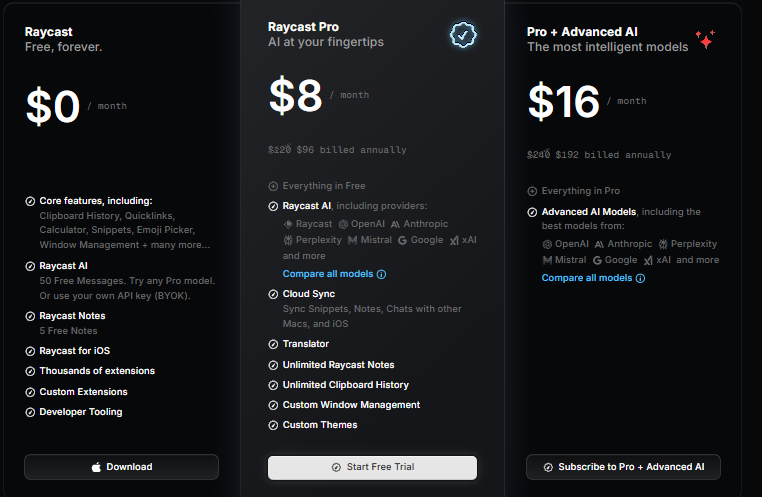
Cost: $8/month (billed monthly) or $96/year.
If you value your time at even $50/hour, you only need to save 2 hours a year to break even.
In my first week, the AI integration saved me about 45 minutes of “tab shuffling.” The Cloud Sync saved me 30 minutes when setting up a loaner laptop. The ROI is immediate for power users.
Pros & Cons Summary
✅ The Pros
- Native AI: Access GPT-4 or Claude without opening a browser.
- Sync: Keeps multiple Macs perfectly identical.
- Design: Custom themes and icons are beautiful.
- Privacy: Data is encrypted; they don’t train models on your data.
❌ The Cons
- Subscription Model: Another monthly recurring cost.
- Mac Only: Zero support for Windows or Linux.
- Learning Curve: Pro features take time to configure properly.
🏆 The Expert Verdict
Best For: Developers, Product Managers, and users with multiple Macs.
Not For: Casual users who just want to launch apps.
Summary: If you use your Mac for work, Raycast Pro pays for itself in efficiency.
. The AI integration transforms it from a “launcher” into a “copilot.” However, if you don’t care about AI or Sync, the Free version remains the best deal in software today.Final Thoughts
My advice? Don’t just upgrade blindly.
Start with the Free version. Push it to its limits. Install extensions, set up hotkeys, and see if you hit a wall.
If you find yourself wishing your settings would transfer to your laptop, or you’re tired of copy-pasting code into ChatGPT, then pull the trigger on the 14-day trial.
. You likely won’t go back.Do you use Raycast Pro? Or have you stuck with the free version? Let me know in the comments below.
Frequently Asked Questions
Is Raycast Pro worth it just for the Cloud Sync?
If you only have one Mac, no. Cloud Sync is useless for single-device users. However, if you switch between a work laptop and a personal desktop daily, the $8/month is worth it solely to keep your clipboards and snippets consistent across both machines.
What happens to my data if I cancel the Pro subscription?
If you cancel, you downgrade to the Free plan. You will keep your local data, but you will lose access to Cloud Sync and AI. If your snippet library exceeds the Free limit, it will likely become “read-only” until you delete enough items to fall back under the cap.
Can I use my own OpenAI Key (BYOK) with the Free version?
No. The Free version does not support the native AI Chat interface, even if you have your own key. To use the integrated AI interface with your own API key (to pay OpenAI directly instead of Raycast), you still need the Pro subscription to unlock the feature.
Does Raycast Pro replace ChatGPT Plus?
For many users, yes. Raycast Pro gives you access to GPT-4o, Claude 3.5 Sonnet, and other premium models. If you primarily use ChatGPT for text generation and coding assistance, you might be able to cancel your $20/month ChatGPT Plus subscription and switch to the $8/month Raycast Pro plan, saving you money.