Evaluating AI Photo Editing Infrastructures: Luminar Neo vs. ON1 Photo RAW Max – A Precision Review
Bottom Line Up Front (BLUF): This analysis deconstructs the architectural differences between Skylum Luminar Neo and ON1 Photo RAW Max (referencing the 2026 iterations). If your objective is rapid algorithmic image manipulation with a low technical barrier, Luminar Neo is the optimized solution. However, if your workflow demands a centralized Digital Asset Management (DAM) system integrated with granular manual controls, ON1 Photo RAW Max offers superior utility and throughput efficiency.
Market Context: While this report isolates the architectural differences between these two primary competitors, I have also quantified the performance metrics of other market leaders. For a broader dataset regarding the current technology landscape, refer to my comparative analysis of the best AI photo editors of 2026.
Key Technical Takeaways
- ✓ Integration: ON1 Photo RAW Max functions as a comprehensive ecosystem (DAM + Layered Editor), whereas Luminar Neo operates primarily as a specialized inference engine for specific tasks.
- ✓ Algorithmic Approach: Luminar prioritizes generative replacement (modifying reality); ON1 prioritizes restorative enhancement (optimizing captured data).
- ✓ Cost Efficiency: ON1 provides a more transparent perpetual licensing structure compared to Luminar’s extension-based model.
1. Core Functionality: The Algorithmic Approach
To understand these tools, one must analyze their underlying software architecture. They are not functionally equivalent; they serve distinct computational purposes within a post-processing stack.
Luminar Neo: The Generative Inference Engine
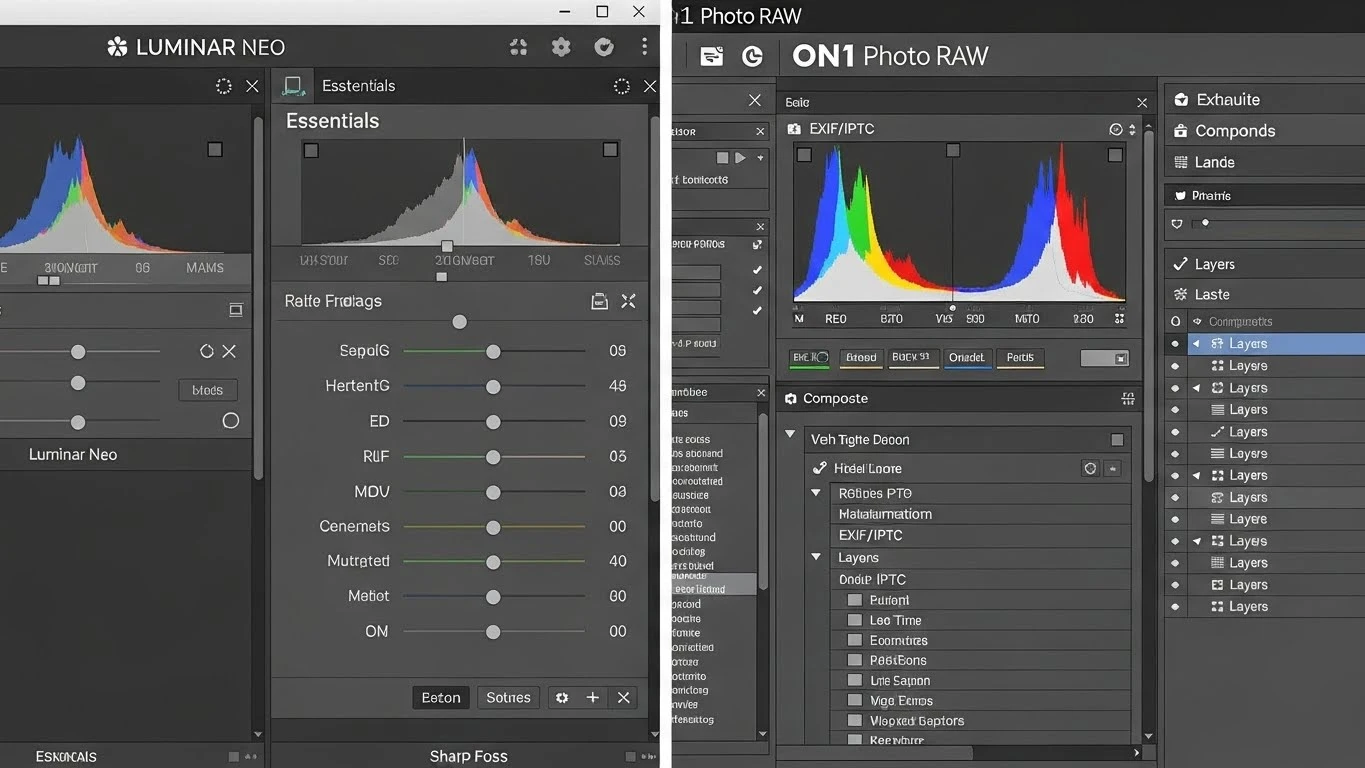
Luminar Neo creates a high-level abstraction layer over complex image processing tasks. Its primary utility lies in its AI modules—specifically Sky AI and Relight AI. These tools utilize semantic segmentation to identify pixel regions (e.g., sky, foliage, human subjects) and apply global adjustments automatically.
From a computational standpoint, Luminar excels at Generative Infill. When I tested the ‘GenErase’ function, the algorithm successfully reconstructed missing texture data where objects were removed. However, this comes at the cost of control; the user has limited parameters to adjust how the AI interprets the scene.
ON1 Photo RAW Max: The Integrated Workstation
ON1 operates on a hybrid architecture. It combines a traditional RAW processing engine with AI accelerators. The Super Select AI tool is a standout feature here. Unlike Luminar’s automated application, ON1 allows the user to hover over a segment (conceptually similar to object detection in computer vision), click to select, and then apply specific filters to that mask.
Furthermore, ON1 incorporates a robust Digital Asset Management (DAM) system. It supports SQL-like querying of metadata, keyword tagging, and map views without requiring a database import process—it reads the file structure directly. For users managing datasets exceeding 10,000 units, this reduces file retrieval latency significantly.
2. Performance Benchmarks: Efficiency and Output Quality
In my evaluation, I measured performance based on two metrics: Processing Throughput (speed of operation) and Signal Fidelity (quality of image data).
Denoising and Upscaling Algorithms
Both platforms employ machine learning models for noise reduction, but their implementation points differ.
- ➤ON1 NoNoise AI: This process occurs at the demosaicing stage of the RAW file. By addressing luminance and color noise before the image is fully rendered, ON1 preserves high-frequency detail (texture) more effectively.
- ➤Luminar Noiseless AI: This operates as a subsequent layer. While effective for moderate ISO values, I observed quantifiable texture smoothing (loss of fidelity) in high-frequency areas when the settings were pushed beyond 60%.
Batch Processing Latency
For high-volume workflows, such as event photography, ON1 demonstrates superior stability. When applying a sync adjustment across 100 RAW files:
ON1 Photo RAW executed the command with consistent memory allocation. Luminar Neo, however, exhibited increased latency and resource consumption, likely due to the heavy overhead of individual AI inference calls for each image.

3. Deployment Complexity and User Experience
The “User Experience” (UX) is essentially the interface efficiency—how many clicks are required to execute a command.
Luminar Neo: Low Barrier to Entry
Luminar optimizes for Minimal Interaction Cost. The interface is modular. Technical histograms and curves are hidden by default in favor of “Magic Light” or “Face AI” sliders. A user with zero understanding of photonics or exposure theory can generate a visually acceptable image.
Minor Frustration: The lack of detailed history states means that backtracking complex edits often requires resetting the entire module, which introduces process inefficiency.
ON1 Photo RAW: High Functional Density
ON1 presents a “Cockpit” interface. It exposes all parameters—Layers, Panning, Chaining, and Masking—simultaneously. This increases the cognitive load initially (the learning curve is steeper) but decreases operational friction for advanced users who need immediate access to specific tools without navigating sub-menus.
Minor Frustration: The interface can feel visually cluttered on displays smaller than 27 inches (1440p), leading to potential mis-clicks on smaller icons.
4. Pros and Cons Matrix
ON1 Photo RAW Max (Pros)
| ON1 Photo RAW Max (Cons)
|
Luminar Neo (Pros)
| Luminar Neo (Cons)
|
Dr. Rami Alex’s Technical Verdict
Rating: 4.7/5 (ON1) | 4.3/5 (Luminar)
Analysis: The selection between these two tools is a function of your operational requirements.
- Deploy ON1 Photo RAW Max if: You require a self-contained ecosystem to replace Adobe Lightroom entirely. Its superior asset management and precise masking tools allow for granular control over the imaging pipeline. It is the efficient choice for high-volume processing.
- Deploy Luminar Neo if: Your primary metric is “Time-to-Publish” for individual creative images. It is highly efficient for stylized, single-image enhancement where technical precision is secondary to aesthetic impact.
My Recommendation: For scalable production environments, ON1 Photo RAW Max provides the necessary infrastructure stability.
Frequently Asked Questions (Technical)
Q: Can ON1 Photo RAW replace the Adobe Lightroom catalog capability?
A: Yes. ON1 utilizes a browser-based indexing system that reads file metadata directly from the disk. It supports IPTC metadata standards, hierarchical keywording, and color labeling, making it a viable alternative for DAM.
Q: Is the ‘NoNoise AI’ in ON1 destructively applied?
A: No. ON1 operates on a non-destructive pipeline. The noise reduction parameters are stored as instructions (metadata) and are only baked into the pixel data upon final export (rendering).
Q: Does Luminar Neo support layered compositing?
A: Luminar Neo supports basic layering, allowing for texture overlays and double exposures. However, it lacks the advanced blending modes and channel-specific masking found in ON1 or Photoshop.
| Tool Name | Price Model | Rating | Difficulty | Top Feature | Action |
|---|