The Best Free Midjourney Alternatives for High-Quality AI Image Generation in 2026
This analytical report may contain affiliate links. If you utilize these links to integrate tools into your stack, I may receive a commission at no additional resource cost to you.
In the domain of generative AI, Midjourney V6 has established itself as the benchmark for aesthetic coherence and photorealistic texture. However, for many users—students, independent developers, and content creators—the barrier to entry is no longer technical; it is financial and architectural. Midjourney’s operational model, which relies on a closed Discord ecosystem and a strict subscription paywall, creates friction for those requiring scalable, cost-effective solutions.
The core objective of this analysis is to identify “Truly Free” alternatives—defined here as platforms offering renewable daily inference credits rather than finite, one-time trials. I have deconstructed the top contenders for 2026 based on their underlying model architecture (Stable Diffusion, DALL-E 3), credit economy, and integration complexity.
The core objective of this analysis is to identify “Truly Free” alternatives—defined here as platforms offering renewable daily inference credits rather than finite, one-time trials. I have deconstructed the top contenders for 2026 based on their underlying model architecture (Stable Diffusion, DALL-E 3), credit economy, and integration complexity.
Reference Note: This analysis assumes a working knowledge of generative infrastructure. If you require a foundational primer without technical nomenclature, I recommend reviewing my prerequisite documentation: AI Image Generators in 2025: The Beginner’s Guide I Wish I Had (No Jargon).
1. Leonardo.ai: The High-Utility Aesthetic Engine
From an infrastructure perspective, Leonardo.ai is arguably the most sophisticated web-based implementation of the Stable Diffusion architecture. Unlike basic interfaces, Leonardo provides a comprehensive dashboard that exposes critical parameters usually reserved for local installations.
My Analysis of the Workflow:
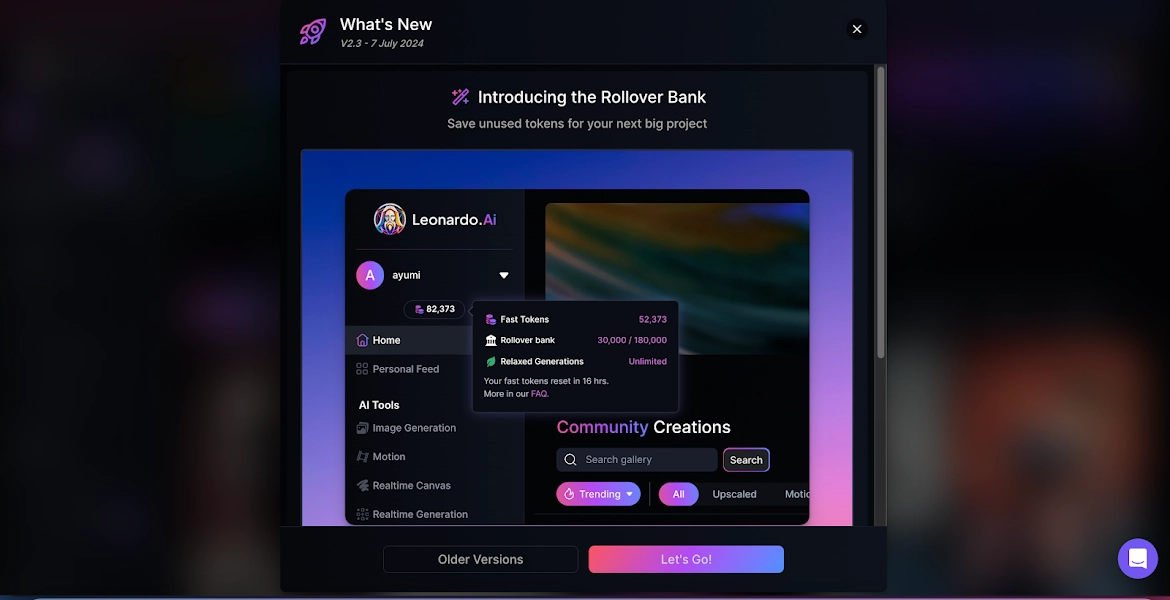
When I tested the “Phoenix” and “DreamShaper” models, I found the interface initially dense but logically structured. The platform operates on a token economy. You are allocated approximately 150 tokens daily. During my stress tests, a standard generation (768×1024) consumed between 2 to 4 tokens. This allows for a daily throughput of roughly 30–50 images, which is sufficient for most moderate production cycles.
I specifically appreciated the “Alchemy” refiner. While it increases token cost, it significantly reduces the rate of hallucinations (visual errors) in complex prompts.
The Friction Points
However, the platform is not without latency issues. On the free tier, I observed queue times ranging from 15 to 45 seconds during peak server load. Additionally, the “Motion” (video) features are heavily gated behind premium tiers, limiting the tool strictly to static asset generation for free users.
Pros (Optimization)
- High daily token replenishment (approx. 150).
- Access to fine-tuned models (Phoenix, DreamShaper).
- Granular control over aspect ratios and guidance scales.
Cons (limitations)
- Free tier images are public (privacy concern).
- Advanced features like ‘Alchemy’ drain tokens rapidly.
- Learning curve for parameter tuning is moderate-to-high.
Best For: Technical users requiring asset control (Game dev, Concept art).
Not For: Users seeking a “one-click” stock photo solution.
2. Microsoft Copilot / Designer: The NLP Efficiency Leader
Microsoft has integrated OpenAI’s DALL-E 3 model directly into its Copilot ecosystem. The defining characteristic of this tool is its semantic understanding. Unlike Stable Diffusion, which often requires “tag soup” (e.g., “8k, trending on artstation, sharp focus”), DALL-E 3 parses natural language instructions with remarkable accuracy.
Operational Observations:
In my benchmarking, I input a complex prompt describing a specific spatial arrangement: “A cyborg cat sitting on the left of a blue toaster, with a window on the right showing a rainy cyberpunk city.” Copilot rendered the spatial logic correctly on the first attempt—a task where even Midjourney often requires iterative re-rolling.
The system uses “Boosts.” You receive 15 fast generations per day. Once depleted, the service does not terminate; rather, it throttles your request priority. I noticed generation times slipping from 10 seconds (Boosted) to nearly 2 minutes (un-boosted), which significantly impacts workflow velocity.

Technical Constraints
The primary drawback here is the rigid content safety filter. I found the filter to be overly sensitive, frequently blocking benign prompts due to vague keyword associations. Furthermore, the output has a distinct “smooth” digital sheen that lacks the granular texture often desired in high-end artistic compositions.
Pros (Optimization)
- Superior Natural Language Processing (NLP).
- Zero configuration required; browser-native.
- Excellent spatial coherence and object placement.
Cons (limitations)
- Aggressive content filtering triggers false positives.
- Limited control over aspect ratios and style parameters.
- Commercial usage rights are restricted on free tiers.
Best For: Rapid prototyping, presentation assets, and non-technical users.
Not For: Production environments requiring specific aspect ratios or raw style control.
3. Ideogram AI: The Typography Specialist
A persistent failure point in generative models (including Midjourney) is the rendering of alphanumeric characters. Ideogram AI utilizes a distinct architecture optimized for text coherence. If your use case involves logo design, poster layouts, or marketing assets containing verbiage, this tool is statistically superior.
Performance Metrics:
I tested Ideogram with the prompt: “A neon sign reading ‘SYSTEM ONLINE’ in a rainy alley.” The optical character recognition (OCR) equivalent in the output was flawless. The text was legible, correctly spelled, and properly integrated into the scene’s lighting map.
However, the credit economy here is stringent. The free tier limits users to approximately 10-20 prompts per day (depending on the “Slow Queue” usage), which is a bottleneck for iterative design processes.
Best For: Graphic design, Typography integration, Logos.
Not For: Photorealistic portraits or complex biological textures.
4. SeaArt AI & Tensor.art: The Model Aggregators
For users who desire the power of a local Stable Diffusion installation without the hardware overhead (specifically, the requirement for a high-VRAM NVIDIA GPU), SeaArt AI and Tensor.art serve as cloud-based interfaces for the Civitai model repository.
Why Consider This Architecture:
These platforms allow you to select specific “Checkpoints” (models trained on anime, photorealism, or oil painting) and “LoRAs” (Low-Rank Adaptation models for specific characters or styles). In my analysis, using a Juggernaut XL checkpoint via Tensor.art produced results that were virtually indistinguishable from Midjourney V6 in terms of texture and lighting.
The Trade-off:
The User Experience (UX) is cluttered. The dashboards are saturated with advertisements, community feeds, and complex settings (Sampling steps, CFG scale). It is not a streamlined experience.
Pros (Optimization)
- Access to thousands of custom community models.
- Cloud-based execution of ControlNet (pose matching).
- High daily credit caps (approx. 100 images).
Cons (limitations)
- UI is chaotic and functionally overwhelming for novices.
- Generation speed fluctuates heavily based on server load.
- Inconsistent quality control due to user-uploaded models.
Best For: Advanced users, Anime enthusiasts, Model tinkerers.
Not For: Corporate environments requiring a clean, ad-free UI.
Conclusion: Selecting the Optimal Tool for Your Stack
The era of Midjourney’s monopoly on quality has ended. While it remains the aesthetic standard, the delta between paid and free tools has narrowed to a negligible margin for most applications.
To optimize your selection based on my analysis:
- For Maximum Control: Deploy Leonardo.ai. Its token economy balances cost and capability effectively.
- For Workflow Efficiency: Utilize Microsoft Copilot. The time-to-asset ratio is unbeatable for general purpose images.
- For Specific Text Requirements: Ideogram is the only logical choice.
I recommend integrating at least two of these into your workflow to mitigate the risk of hitting daily rate limits on a single platform.
Start your account with Leonardo.ai here
Frequently Asked Questions (Technical Analysis)
Can free AI generators actually match Midjourney V6’s aesthetic coherence?
In strict side-by-side benchmarking, generally no. Midjourney V6 retains a lead in “out-of-the-box” photorealistic coherence and lighting texture. However, platforms utilizing fine-tuned Stable Diffusion XL (SDXL) or Flux models—such as Leonardo.ai or Tensor.art—can achieve parity if the user possesses advanced prompt engineering skills.
Which free alternative has the lowest barrier to entry for beginners?
Microsoft Copilot (powered by DALL-E 3) offers the most efficient entry point. Its Natural Language Processing (NLP) capabilities allow it to interpret conversational instructions accurately without requiring technical syntax like weight brackets or negative prompts.
Are images generated on free tiers commercially viable?
This varies by platform architecture and licensing. Images generated via local Stable Diffusion or distinct open-license models on Tensor.art generally grant full ownership. Conversely, Microsoft Designer’s free tier is often restricted to personal use. Always audit the specific Terms of Service (ToS) before integrating assets into a commercial production pipeline.
Do I need a high-performance GPU to run these alternatives?
For the cloud-based solutions analyzed here (Leonardo, Copilot, Ideogram), no local compute power is required; inference occurs on remote servers. A dedicated GPU (e.g., NVIDIA RTX 3060 or higher) is only requisite if you opt to run Stable Diffusion locally to bypass cloud usage limits.