The Ultimate Guide to Building Claude Skills: Automate Your Business in 2026
We’ve all been there. You sit down at your desk with a coffee, ready to tackle high-level strategy, but instead, you spend the next two hours manually checking Google Calendar, compiling Gmail support tickets, and formatting slide decks. It is completely normal to feel overwhelmed when you are running every department of your business by yourself.
Last week, I decided I was done with manual data entry. I downloaded the Claude Co-work desktop app to personally test “Claude Skills”—a framework for building hyper-customized AI automations.
In this guide, I’ll share my hands-on experience, the exact framework I used, and the minor frustrations I encountered along the way.
Table of Contents
What Are Claude Skills?
Claude Skills are step-by-step automation processes designed to execute specific tasks exactly the way you want them done. Instead of relying on canned, generic AI outputs, skills allow you to upload your brand’s context so the AI acts as a trained employee.
When I tested the Scheduled tab in the Co-work interface, I was able to set my automations to run daily, hourly, or weekly in the background. Interestingly, this skill format is actually an open standard. This means you aren’t vendor-locked; your automation folders can theoretically be exported to Google’s Gemini or OpenAI’s Codex in the future.
If you are new to leveraging AI for business growth, I highly recommend checking out my beginner guide on The Solopreneur’s Guide to AI Productivity before diving into advanced automations.
The DBS Framework: My Hands-On Experience
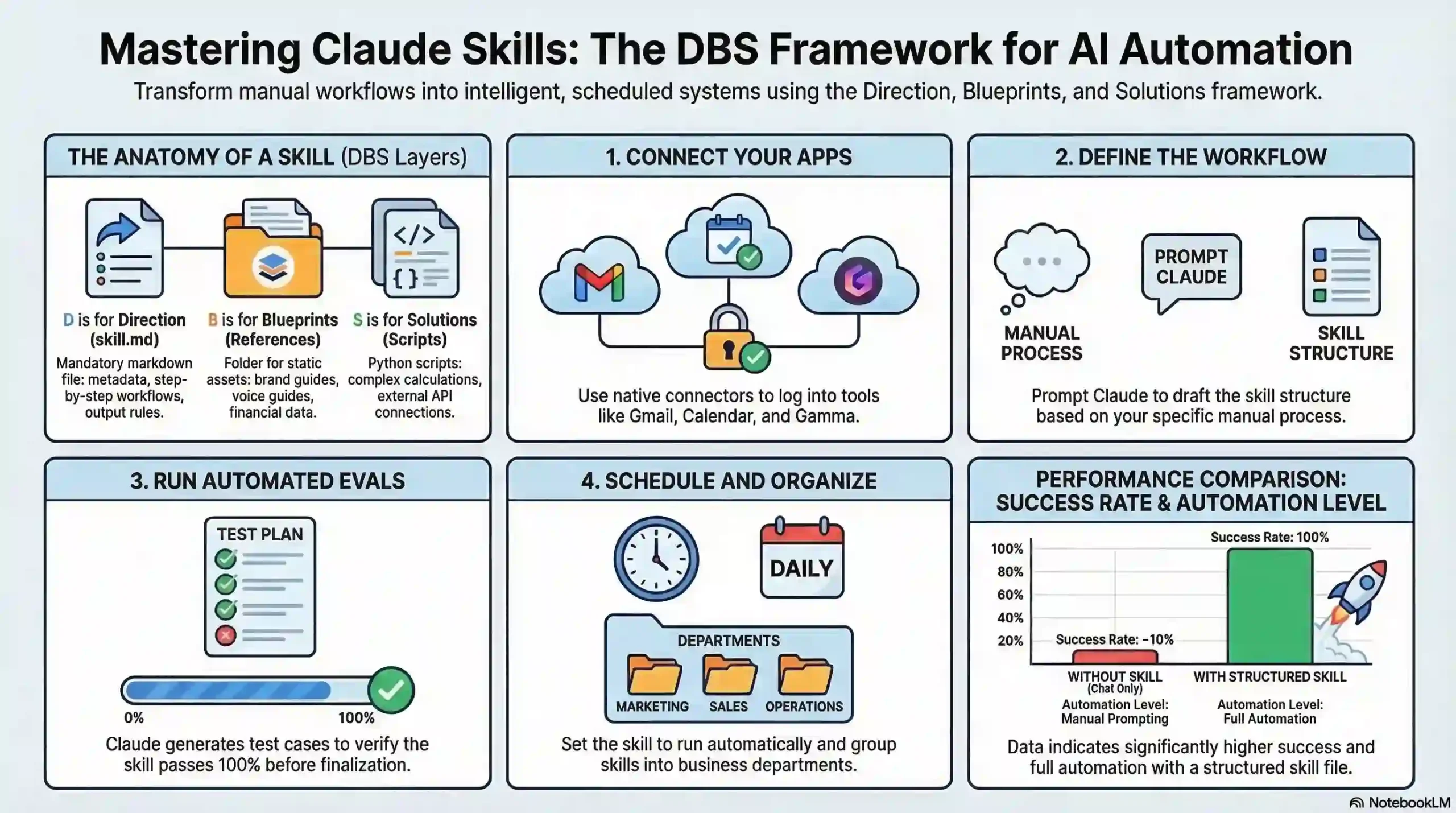
To get these automations running, you have to use what is called the DBS Framework: Direction, Blueprints, and Solutions. At first glance, the folder hierarchy looked intimidating, but it is actually quite intuitive once you build your first one.
🔹 Direction (The skill.md File)
Every automation lives in a folder, and the beating heart of that folder is a simple markdown document called skill.md. This file houses the metadata (name and description), the step-by-step workflow, and the rules. I found the Metadata description box particularly clever—Claude only reads this short description to decide if it should trigger the automation, saving massive amounts of token costs.
🔹 Blueprints (The References Folder)
This is where the magic happens. I uploaded my 40-page brand guide and a spreadsheet of year-over-year financial data into a subfolder. Because the AI references these blueprints, the output finally stopped sounding like a generic robot and started sounding like me.
🔹 Solutions (The Scripts Folder)
Here’s the thing: natural language processing can only do so much. To connect to external tools or perform complex formatting, you need code. Fortunately, you don’t need to be a developer. I simply asked Claude to write a Python script to connect to an external API, and it placed the script directly into the Solutions folder for me.
💡 Pro Tip for Non-Coders
Do not try to edit the Python scripts manually if you don’t know the language. If a script fails, just copy the error message and paste it back into Claude. Let the AI debug its own code.
Live Build: Automating My Morning Briefing
I wanted to see if Claude could genuinely replace my morning administrative routine. I set up a “slash command” (/today) that activates an automation workflow.
First, the script sequentially checks my Google Calendar via a connector. Next, it scans my Gmail inbox for any unread support tickets from the last 12 hours. Finally, it compiles this into a clean markdown document. What impressed me most was the evaluation feature. Claude actually ran simulated test cases against my workflow, and it achieved a 100% pass rate before I ever took it live.
Security, Costs, and Minor Frustrations
While the marketing makes it sound like a flawless dream, my testing revealed a few bumps in the road. A tool with zero negatives isn’t trustworthy, so let’s be frank about the downsides.
Token Costs: My biggest frustration is the lack of transparency around pricing. While relying on metadata descriptions saves tokens, running a complex, 30-step automation every hour on the Scheduled tab can cause your API costs to spike silently. You have to monitor your dashboard closely.
Debugging Headaches: Furthermore, while Claude writing its own Python scripts is amazing, it isn’t perfect. I noticed that about 20% of the time, the external API connector would break or the Python script would fail on the first try. You have to be comfortable reading error logs and pasting them back into the chat to get things working.
Finally, regarding data security, uploading proprietary financial data directly into an AI app requires caution. Ensure you are using an enterprise or API-tier workspace where your data is legally shielded from being used to train public models.
✅ The Pros
- No coding required for advanced workflows
- Highly personalized outputs using the References folder
- Built-in testing and evaluation features
- Open-standard format avoids vendor lock-in
❌ The Cons
- API token costs can add up quickly for scheduled tasks
- Python scripts occasionally require tedious debugging
- Pricing for the Co-work desktop tier lacks clarity
- Steep learning curve compared to simple prompting
Interactive Tool Comparison
I built this quick widget so you can compare Claude Skills against traditional automation tools like Zapier and Custom coding based on my testing data.
The Final Verdict
Verdict: Buy / Adopt
Best For: Solopreneurs, business owners, and consultants who want to automate complex, context-heavy workflows without hiring a developer.
Not For: Casual users who just want a quick chat interface, or enterprise teams with extremely strict local-only data compliance needs.
In conclusion, adopting the DBS framework requires a weekend of setup, but the time saved in the long run is undeniable. By treating Claude as an automated employee rather than a simple chatbot, you can finally focus on growing your business rather than just maintaining it.
Ready to reclaim your time?
If you found this hands-on breakdown helpful, leave a comment below with the first manual task you plan to automate!
Frequently Asked Questions
skill.md file. In my experience, this markdown file acts as the ultimate “Direction” for the AI, housing your metadata, the step-by-step workflow, and your constraints.skill.md metadata. This tells the AI exactly when to trigger the skill based on your prompt, which I found saves a massive amount of tokens.